Blog Azure Security & Compliance

Azure Bastion: The Best Way to Secure your VMs?

There are a few ways to connect to a virtual machine (VM) in Azure.

But exposing your VM to the public internet via RDP or SSH ports is risky; those ports are common targets for attacks. 

In this article, we’ll cover what Azure Bastion is, how it works, and how it provides secure, external access to your Azure VMs without opening them to the internet. 

Niels Kroeze

Author

Niels Kroeze IT Business Copywriter

Reading time 7 minutes Published: 27 January 2026
KEY POINTS:

  • Azure Bastion provides secure RDP/SSH access to Azure VMs via private IPs, without exposing ports like 3389/22 to the internet.
  • Reduces attack surface and supports modern access controls via Microsoft Entra ID, RBAC, MFA, and conditional access.


What is Azure Bastion? 

Launched in 2019, Azure Bastion is a fully managed PaaS service that provides secure access to your Windows or Linux VMs via their private IP address.  

The best part? You no longer need to open sensitive ports such as 3389 (RDP) or 22 (SSH), as it works without exposing your VM to the public internet. Bastion sits in front of it and securely relays your connection. 

This means you can remotely into VMs without a direct line of sight, without installing agents or making changes to your VMs. 

Bastion acts like a fully managed gateway, deployed and scaled in your own virtual networks.” 

Why do we use Azure Bastion? 

The most common way to connect to a VM in Azure is through RDP (Windows) or SSH (Linux). It works, but it’s far from modern, and more importantly, secure.

To do this, you have to assign a public IP address to the VM and open RDP or SSH ports to the internet; these are common, frequent entry points for attackers scanning for exposed servers. It’s basically an open invitation to brute-force attempts and exploits.  

Now, you can imagine why most organisations don’t prefer to place servers on the “open” internet. If it’s not for security concerns, it’s for cost. Once a VM has a public IP address, it can start routing outbound traffic, bypassing other controls such as firewalls and content filtering. 

You could restrict access with a Network Security Group (NSG) to specific IP addresses, but that quickly becomes unmanageable in larger environments with many users or VMs. 

Azure Bastion removes that risk.

It lets you securely connect to your VMs throught the Azure portal or your local client without exposing them to the public internet or opening any inbound ports. 

Azure Security Ebook (1)

Security E-book

Learn how to secure your Azure environment with different technologies, tools and best practices we apply daily for our customers.

Download now!

Benefits of Azure Bastion 

There are benefits when using Azure Bastion in your setup, such as:   

  • Secure remote access to Azure VMs: Does not require opening RDP port (3389) or SSH port (22) to the internet or configure network security groups (NSGs) for remote access. 
  • Modern authentication and access: It integrates with Microsoft Entra ID and can enforce zero-trust aligned authentication, such as RBAC, MFA, and conditional access.  
  • Centralised logging and monitoring: Keep full visibility of who connects and when. 
  • Reduced attack surface: Bastion acts as a shield, keeping your VMs off the public internet. 
  • Direct access via the Azure Portal: Connect to your VM directly from the portal without extra tools or special configuration. 
  • Simplified operations: Managed PaaS service that scales automatically and fits into most environments with minimal setup. 

Overall, the management and security features make it a good option for most environments.  

Note:

Azure Bastion is a PaaS service and doesn’t come for free; it's billed hourly and can't be deallocated when not in use. Actual pricing depends on the region and the SKU deployed. 

How does Azure Bastion Work? 

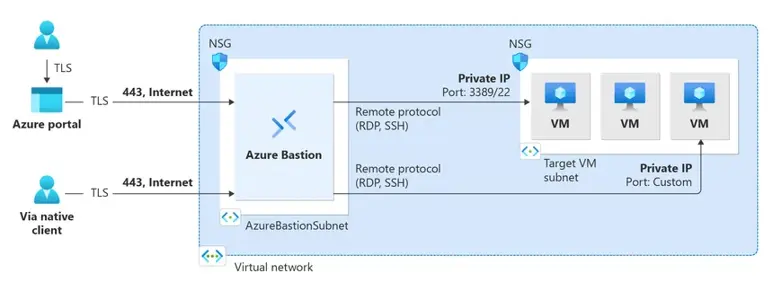
Behind the scenes, Bastion is deployed in a dedicated subnet called AzureBastionSubnet with a public IP. In the Basic SKU, two load-balanced instances handle all connections, but you don’t manage these directly.  

When you connect to a VM: 

  • Your client (browser or RDP/SSH client) connects via HTTPS to the Bastion public IP. 
  • Bastion then connects from its subnet to the target VM using the port and protocol you specify. 
  • You can use any port you need; you’re not limited to default RDP (3389) or SSH (22). 
  • Network Security Groups (NSGs) on the VM must allow traffic from the Bastion subnet on the required ports. 
  • Bastion requires direct network access to the VM to relay your connection. 

Diagram illustrating Azure Bastion connectivity via HTTPS (port 443) from the Azure portal or native client into a virtual network to reach target VMs using RDP or SSH protocols.

That said, there are more SKUs from which you can choose. 


Different SKUs 

There are three SKUs available: Basic, Standard, and Premium.

  • Basic: Sufficient for smaller environments that only need remote access to VMs.
  • Standard: Adds features such as custom inbound ports, Azure CLI connectivity, host scaling (beyond a single instance), file upload/download, shareable links, and the ability to disable copy/paste.
  • Premium: Includes everything in Standard, plus session recording and the option for a private-only deployment.
Note:

All SKUs are billed hourly, and you can upgrade SKUs at any time. However, downgrading isn’t supported.  

There’s also a Free Developer edition, which is shared and fully free but limited in functionality. 

Azure Bastion supports host scaling to handle multiple connections. A scale unit is called a host instance: 

  • Basic: 1 instance 
  • Standard & Premium: start with 2 instances, scalable up to 50 
Mind you:

Additional instances incur extra costs, as do outbound data transfers beyond the first 5 GB per month. 

You can connect to VMs in the same VNet or across peered VNets, both within the same region or globally, and even across subscriptions in the same tenant. However, connections do not work across different tenants. 

This means a single Bastion deployment can serve multiple VNets, making it easier to manage remote access across complex Azure environments. 

Azure Security Workshop

Want to learn how to secure your Azure cloud?

Then watch our Azure Security On-demand for practical tips, best practices, and demos on securing your Azure environment. 

Watch it now!

What are the limitations of Azure Bastion? 

Like most cloud services, Azure Bastion also has a few limitations to be aware of: 

  • Only supports IPv4: Both the public IP and target VMs must use IPv4. 
  • No naming convention: The Bastion subnet must be named AzureBastionSubnet; no other resources can be deployed there. 
  • User-defined routes (UDRs) aren’t supported: Traffic cannot be forced through firewalls or NVAs.  
  • Not flexible: Once an SKU is selected, you can upgrade but cannot downgrade without redeploying. 


Closing thoughts 

When managing VMs, you want the right people to have access, without unnecessary risks. Azure Bastion addresses this by providing secure RDP and SSH access, protecting VMs from zero-day exploits, and reducing the attack surface. 

It’s not just about security; Bastion also simplifies management, enforces compliance, and reduces operational risk. Even with Bastion, proper VM hardening and network configuration remain important, but it makes scaling across multiple VNets and managing access policies much easier. 

It’s about safer, more controlled access without unnecessarily exposing your servers. Alternatives like Azure Virtual Desktop (AVD) can also provide external access, but Bastion remains a lightweight, centralised solution, suitable for most environments. 

FAQ About Azure Bastion

What is Azure Bastion?

Is Azure Bastion safe?

Does Azure Bastion require a public IP?

Is Azure Bastion IaaS or PaaS?

How much does Azure Bastion cost?

What is the difference between Azure Bastion Basic and Standard?

What is the alternative to Azure Bastion?

Is Bastion more secure than RDP?

What is the difference between Azure Bastion and point-to-site VPN?

Deni visual

Get in touch!

Intercept can help you secure your Azure cloud so you can focus on delivering value to your customers and driving business.